Client Management CRUD App
Using:
● WPF
● EntityFramework Core FluentAPI
● ADO.NET Stored Procedures
● Hashing registration data
● MainMigration.cs
generating the register user, login validation, email verify, and reset password stored procedures
generating 50 new rows into clients & orders tables
(while generated the system can tell if a client is male or female by his/her name and if a client is in permanent service by their rank and role)
● Admin privileges
UserName: admin
Password: admin
● Reset password via SMTP sending confirmation code
● State Machine Pattern
● Use update-database before build/debug (Tools>NuGet Package Manager>Package Manager Console> type: update-database)
Note for hebrew - הערה חשובה
בשני המחשבים שלי לא נתקלתי בבעיה הזאת, כשניסיתי על מחשב אחר את הפרויקט כל האותיות בעברית ברשומות של החיילים והזמנות היו כסימני שאלה, יצרתי גיף שמדגים איך יצירת הרשומות מתחוללת ללא בעיה עם עברית במחשב שלי ב סוף הדף
במידה וזה המצב יש הסבר כאן שמדגים איך לשנות את הרשומות מעברית לאנגלית
אם לאחר update-database מופיע השגיאה
.parameters describe an un-representable DateTimeלחץ כאןאם לאחר update-database מופיע השגיאה
6.0.0is not compatible with net5.0-windows7.0או אם במידה ואתה משתמש ב Visual Studio 2022 אנא היכנס לכאן בכדי להוריד זמן ריצה של NET 5. והורד על פי מפרט המערכת שלך מ Run desktop apps
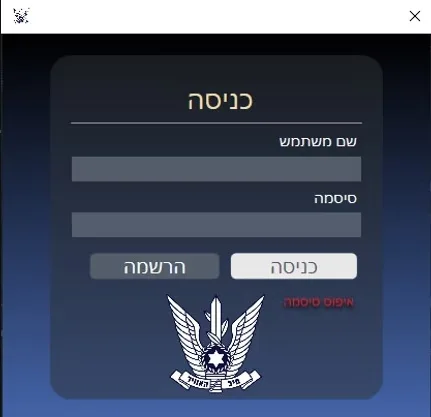
I document here my midterm project, which where you can register into the database using hashing queries, login with a validation procedure and connect to my app where you can do CRUD operations on clients/orders tables in the database.
While using the pmc command, the migration file will generate 50 random clients and 50 random orders.
You can also view all aircrafts in use in the IAF and all the operating squadrons.
-hashed registration demonstration & admin user login:
note: Username in this demo video is only 4 characters long, while in the project updated username to most contain at least one number and one letter, at minimum length of 4 characters.
Updated password to be at least one uppercase letter and one lowercase letter, at minimum length of 8 characters.
Models
● clientInfo Class

● OrdersInfo Class

● LoginInfoHashed Class

FluentAPI Config
Configuration Models
Each config model Implements IEntityTypeConfiguration interface to allow configuration for an entity type to be written in a separate class, rather than in OnModelCreating() at clientsDBContext.
Using the Configure function which contains an EntityTypeBuilder with a generic < !TEntity >(Entity being the model for use), and for example, if I want a certain property of a model / a certain column within the table to be my PrimaryKey, I can write modelBuilder.HasKey(p => p._someProperty);
● Fluent_clientConfig Class

● Fluent_OrdersConfig Class

● Fluent_LoginInfoHashedConfig Class

DbContext
Each model is assigned to a DbSet property which is used to query instances of an < !TEntity >.
Connecting to SQL via .UseSqlServer method, configuring the context to connect to SQL database.
In OnModelCreating using modelBuilder to apply the configurations to the database, using the config models that inherit from IEntityTypeConfiguration to apply the configurations set from in the config model to the database.
● clientsDBContext Class

MainMigration.cs
Made custom SQL operations to create the stored procedures & generate random rows into both tables
Stored Procedures
● sp_RegisterUserHash

Inserts into LoginInfoHashed(Table) a username, email, password, and salt.
salt is a unique id for a password, the unique random id ‘salt’ is generated for each password before it is hashed, each new output is completely different every time.
For example, if 2 users have the same password, in the database they will both have two completely different salt & hashed password strings.
The password input is being hashed using ‘MD5’ HASHBYTES function.
-see Registration Data below for registration validation query for user registration
● sp_LoginUserHash

Select the count from LoginInfoHashed where UserName & Password match the input userName and password from the user
(if count equals 0 = user doesn’t exist in database)
(if count equals 1 = user already exists in database)
In this case, count 1 means access granted for user login.
count 0 cannot login because the user is not registered in the database.
● sp_VerifyEmail

● sp_ResetPassword

Generating Rows in Migration.cs
Created a for loop to execute custom operations by using .Sql method, creating a new random row on each iterate of the loop.
The orders table uses an INNER JOIN query saying: which client (by his id number) ordered which item.
A client can be either male or female, so by his/her name the randomGender function can tell if it is a female or male.
Each clients year of recruit will be 18 years after their birth year, for example:
If a client was born in 1991 his/her recruit year will be 2009.
It can also tell if a client is in permanent service by their rank&role, for example:
If a client's role is a 'Pilot' then he must be in permanent service and he cant have a rank of a non ps client.

-see RandomColumns class for all random functions (Utilities folder)
Registration Data
Check if password has at least one uppercase character and is minimum length of 8 -regex.
Check if username has at least one letter & number and is minimum length of 4 -regex.
Check if username is up to 20 characters.
Check if password is up to 100 characters.
Check if username textbox, password textbox, or email textbox are empty.
Check if password confirmation box is empty.
Check if password input is different from password confirmation input.
Check if email contains ’@’ or a domain name.
If password is matched with the confirmation password box and if the username textbox is NOT empty start UserCheckAsync().
UserCheckAsync function:
First, it will check if username or email you typed in exists in the database or not,
count 0 meaning the username or email you typed in does not exists in the database,
count 1 meaning user name or email already in use.
In this case where we want to register a user, count 0 will create a new user using sp_RegisterUserHash,
because theres no one registered with the given email or username..

Login Data
using sp_LoginUserHash stored procedure,
if count equals 1 with the information you typed in, meaning user exists and can log into guest page.
if username & password is ‘admin’ log into admin page.
if count equals 0 user is not in the database and can create a new one but cannot log in with the count of 0.

Reset Password Data
● GetCodePage
using sp_verifyEmail stored procedure, to check if the input email exist in the database.
if count equals 1 email exist in the database.
if count equals 0 email does not exist in the database.
it will use the sendEmail function from EmailConfirmation class and will open the reset password page only if count is 1.

● EmailConfirmation
Declared the SMTP connection settings, sending a message from the projects email with a random code which will be the confirmation code to reset the password.

● ResetPassword
When update password button is clicked,
Check if password have at least one uppercase & lowercase character and if its at least 8 characters long.
Check if password box is empty.
Check if password box match with password confirmation.
Check if confirmation code is correct, if so run resetPasswordAsync().

resetPasswordAsnyc function:
Will run sp_ResetPassword stored procedure, and will update the password of the given email and of course before we ran the count query, you would not be able to get to this page if count was 0 in GetCodePage.

Data Access Layer
● DAL Class

SQL Stored Procedures
● sp_RegisterUserHash

● sp_LoginUserHash

update-database
update-database in PMC:

Errors & Fixes
Fix-Hebrew-Letters
Change Hebrew rows to English in MainMigration.cs

Fix-DateTime-Error

If after update-database you get the following error: parameters describe an un-representable DateTime.
***It makes sense if you didnt get this error on first hand, it should only occur if clients birthdate month is in February and if the days were higher than 28 (except when in Leap Year).
Heres the fix:***
- Refresh Databases in SSMS and delete Dbclients.
- Run update-database again (if error occurs again please delete Dbclients(between 1-3 times) and migration should be applied afterward.
I came across this error when I made the random birthday of a client saying if a client was born in year x he should be recruited on year y: